
Download Daminion – Photo Organizer, Image Catalog, Video Management, Multimedia Library
Overview
Daminion is a specialized productivity tool designed for individuals and teams managing large collections of digital photos and videos. It functions as a comprehensive multimedia library system, enabling users to catalog, organize, and access visual content stored on local drives or networked storage. The app addresses common challenges associated with unstructured digital archives, such as difficulty in locating specific files, inconsistent metadata, and lack of collaborative access control. By providing a centralized cataloging environment, Daminion streamlines the process of managing extensive image and video libraries, making it particularly valuable for photographers, content creators, families with shared photo histories, and small creative teams.
The software supports multi-user access, allowing different individuals to manage their own content within a shared system while maintaining privacy and organization. This feature is especially useful in collaborative settings where multiple contributors need to access and tag media without interfering with one another. Daminion’s ability to handle metadata, apply searchable tags, and support geographic tagging enhances the discoverability of media files, transforming chaotic digital collections into structured, searchable archives. The developer, Daminion Software, has focused on delivering a robust, scalable solution for long-term digital asset management, positioning Daminion as a niche yet powerful tool within the productivity category.
Although the developer did not provide additional technical details about performance benchmarks or system optimization, the app’s design suggests it is built for stability and efficient handling of large datasets. Its relevance in the current app ecosystem lies in its targeted functionality—offering a desktop-grade solution for users who require more than basic photo viewers or cloud-based storage tools. For those seeking a secure, customizable, and scalable system to preserve and navigate their visual history, Daminion presents a compelling option.
Key Features & Functionality
- Multi-User Management: Daminion enables multiple users to access the same catalog while maintaining individual permissions and privacy settings. This is ideal for families sharing a photo archive or teams working on collaborative projects, ensuring each user can manage their own content without disrupting others.
- Advanced Cataloging Options: Users can tag media with keywords, color filters, and custom metadata. The system supports hierarchical tagging, allowing for complex categorization. Files can also be geotagged, enabling location-based searches and map-based navigation of media collections.
- Comprehensive Metadata Access: Daminion displays detailed file metadata, including EXIF, IPTC, and XMP data. Users can edit and enrich metadata directly within the interface, ensuring accurate documentation of image origin, authorship, and usage rights.
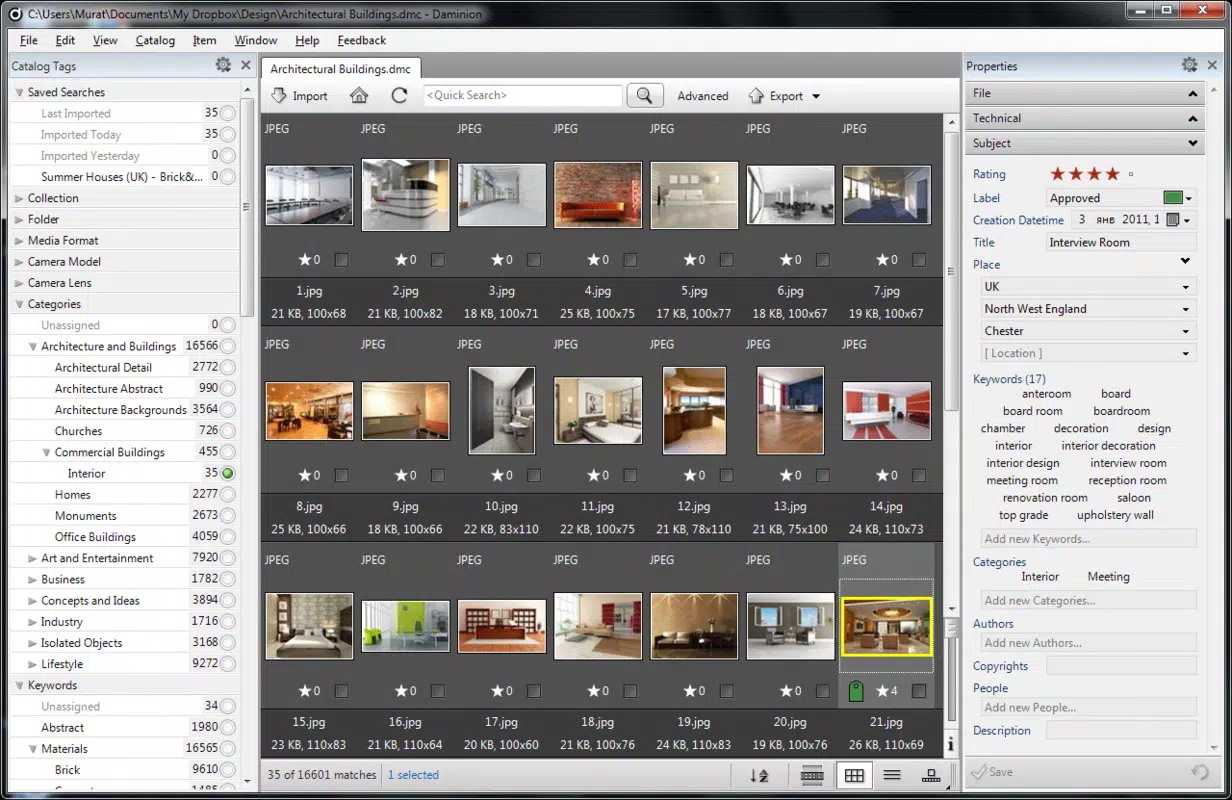
- Intuitive User Interface: The layout is clean and functional, with a central workspace that displays media in thumbnails, lists, or grids. Navigation is streamlined through customizable panels, allowing quick access to tags, folders, and search results.
- Full-Screen Viewing Mode: For presentations or immersive browsing, Daminion supports full-screen playback of images and videos. This feature enhances the user experience by minimizing distractions and allowing for detailed inspection of high-resolution content.
These features collectively empower users to transform disorganized media files into a structured, searchable digital archive. For example, a photographer can tag images by client, date, location, and subject, then retrieve all photos from a specific event in seconds. A family can assign individual folders to members while maintaining a shared timeline of memories. The app’s focus on metadata and tagging makes it suitable for professional-grade asset management, not just casual use.
Interface, UX & Performance
Daminion features a clean, modular interface designed for efficient navigation and long-term usability. The main window is divided into customizable panels, including a media preview area, a metadata editor, a tag browser, and a file tree. This layout allows users to tailor their workspace based on workflow needs, promoting productivity during cataloging and retrieval tasks.
Navigation is intuitive, with drag-and-drop functionality for organizing files and tagging content. Search is responsive and supports multiple filters simultaneously—such as date ranges, keywords, color, and location—enabling precise queries even within massive libraries. The app maintains stability during extended use, with minimal lag reported during image loading and metadata processing.
Although the developer did not list formal performance metrics or device-specific benchmarks, the app’s design suggests optimized handling of large datasets. It is built for desktop environments, where resources such as RAM and storage are typically more abundant than on mobile platforms. Users on high-end systems should experience smooth operation, while those on lower-tier hardware may encounter delays when working with thousands of high-resolution files.
Responsiveness remains consistent across different screen sizes and resolutions, though the interface is primarily optimized for desktop use. There is no indication of touch-based interaction or mobile adaptation, suggesting it is intended for use on Windows desktops and laptops.
Platform Compatibility & Technical Requirements
Daminion is available exclusively for the Windows platform. The current version is 9.0.1.1351, with a file size of 144.1 MB. The developer did not specify minimum OS requirements or hardware specifications beyond the platform. As such, compatibility with specific Windows versions (e.g., Windows 10, 11) or processor types was not disclosed.
Given the app’s focus on managing large multimedia files and metadata, it likely requires a modern Windows system with sufficient RAM and storage space. However, specific requirements were not listed, and users are advised to ensure their system meets general standards for running desktop applications of similar complexity.
Pros and Cons
Pros
- Robust multi-user support for shared photo and video libraries
- Advanced tagging and metadata editing capabilities
- Geotagging and map-based file location search
- Intuitive, customizable interface for efficient workflow
- Full-screen viewing for immersive media experience
Cons
- Platform limited to Windows; no iOS or Android availability
- Developer did not provide system requirements or performance benchmarks
- Price point of $49.95 may be high for casual users
- No mobile app or cloud sync integration mentioned
- Not designed for touch-based devices or mobile use
FAQ
Is Daminion available for Android or iOS?
Daminion is currently only available for Windows. The developer did not announce plans for mobile versions or cross-platform support.
Can I use Daminion to organize photos stored on a network drive?
Yes, Daminion supports cataloging media files stored on local drives and network locations, allowing users to access and manage files across shared storage systems.
Does Daminion support automatic metadata extraction?
Yes, Daminion automatically reads and displays metadata such as EXIF, IPTC, and XMP data from supported image and video files.
How does the multi-user feature work?
Daminion allows multiple users to access the same catalog with individual permissions. Each user can manage their own tagged content while maintaining privacy from others in the system.
Is Daminion secure for storing personal or sensitive media?
Daminion does not specify encryption or password protection features. Users are advised to store the catalog and media files on secure, access-controlled systems.
Final Thoughts
Daminion stands out as a powerful, specialized tool for users with extensive photo and video collections who demand precision, organization, and collaborative access. Its strength lies in its advanced cataloging, metadata handling, and multi-user functionality—features that go beyond standard photo management apps. While it is not a mobile application and lacks cloud integration, it excels as a desktop solution for professionals and serious hobbyists who prioritize control and long-term digital asset preservation.
For photographers, archivists, and families managing decades of visual memories, Daminion offers a structured, searchable, and scalable environment. Its intuitive interface and robust feature set make it a valuable investment for those willing to commit to a desktop-first workflow.
Download Daminion now


